
Local Agentic AI on the Mac with Apple MLX
The stack is called MLX. It reaches from an array framework up to an OpenAI-compatible server that existing agents connect to without changes. For you as a decision-maker it is above all a privacy argument: data that never leaves the device needs no processor agreement.
At WWDC26 Apple showed a complete way to run agentic AI locally on the Mac, with no cloud and no API keys. The stack has four layers: MLX as an array framework for Apple Silicon, MLX-LM to load and quantize models, the MLX-LM Server with an OpenAI-compatible API and tool calls, and any agent framework on top. The Neural Accelerators in the M5 make prompt processing up to four times faster than the M4, and time-to-first-token for a 14-billion model is under ten seconds. With Ollama 0.19, throughput on a Mac mini M4 Pro with a 30-billion coding model rose from 43 to 130 tokens per second, roughly three times. The biggest gain for European companies is privacy: local execution keeps data on the device and avoids the processor relationship under Article 28 GDPR. The limit is model quality, since open models in Mac size still trail frontier models such as Claude or GPT on complex tasks. The sensible path is therefore a privacy-driven start with a local stack for sensitive work and a hybrid architecture for everything else.
What Apple showed at WWDC26
At WWDC26 Apple showed a complete way to run agentic AI locally on the Mac, with no cloud and no API keys. The session "Run local agentic AI on the Mac using MLX" demonstrates an agent that writes code on your own machine, summarizes GitHub pull requests and builds a SwiftUI app from scratch. None of that data leaves the Mac. For companies with data protection requirements this is a concrete lever, not a marketing promise.
What stands out is not a single feature but that the whole path is open-source and available now. Apple builds the strategy on 16 years of its own chip development and frames local models as a privacy argument. How well open models now keep pace with the large providers is something innobu covered in its piece on open-source AI models and the closing quality gap.
How the local stack works
The stack has four layers that build on each other. At the bottom sits MLX, which handles computation, Metal acceleration and memory management. On top of it runs MLX-LM, which loads, quantizes and fine-tunes language models and supports thousands of models from Hugging Face. Above that sits the MLX-LM Server, and at the very top is the agent framework of your choice.
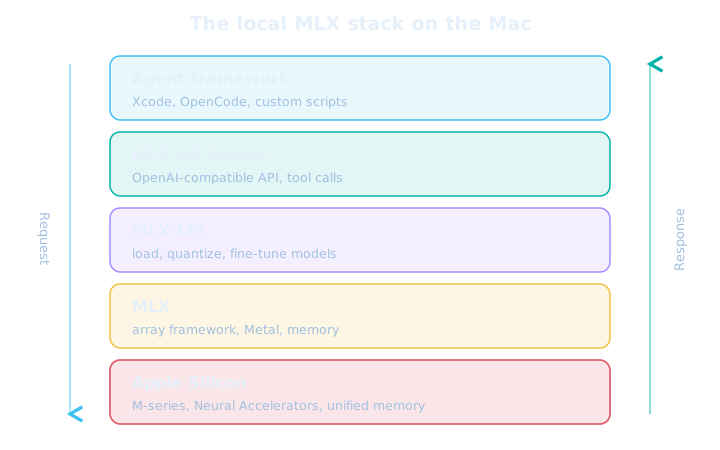
The MLX-LM Server is the core piece for agentic work. It is an OpenAI-compatible HTTP server that supports structured tool calls and reasoning models. Because the API matches OpenAI's standard, any agent framework that speaks the protocol works as a drop-in replacement. Existing tools such as Xcode, OpenCode or custom scripts simply point at the local server instead of the cloud.
-
Install MLX-LM
A single pip command brings the framework and the server component onto the Mac.
-
Start the server with a model
Start the MLX-LM Server with a model that supports tool calls. The key point is that MLX-LM knows a tool parser for the model.
-
Connect the agent
Point your existing agent at the local server address. From here the workflow runs entirely on the Mac.
Why the OpenAI-compatible server matters: it turns the switch between local and cloud into a configuration question, not a rebuild. A team can keep sensitive work local and still route non-critical requests to a cloud service, without rewriting the agent.
Performance: M5 accelerators and distributed inference
Performance hinges on two bottlenecks, and the M5 eases the more important one. Time-to-first-token is compute-bound and benefits from the Neural Accelerators in the M5, while later token generation is limited by memory bandwidth. Prompt processing is exactly what dominates long agent loops with a lot of context, which is why this jump matters so much for agentic work.
| Metric | Value | Source |
|---|---|---|
| Time-to-first-token, 14B dense (M5) | under 10 seconds | Apple Machine Learning Research |
| Time-to-first-token, 30B MoE (M5) | under 3 seconds | Apple Machine Learning Research |
| Matrix multiplication M5 vs M4 | up to 4x faster | Apple Machine Learning Research |
| Token generation M5 vs M4 | plus 19 to 27 percent | Apple Machine Learning Research |
| Memory bandwidth M5 vs M4 | 153 instead of 120 GB/s | Apple Machine Learning Research |
| Ollama 0.19, coding model, Mac mini M4 Pro | 130 instead of 43 tokens/s | Ollama Blog |
The jump does not come from hardware alone. On a Mac mini M4 Pro running the coding model Qwen3-Coder-30B-A3B, throughput rose from 43 to 130 tokens per second purely by switching to the MLX backend in Ollama 0.19, roughly three times. Independent comparisons put MLX 20 to 87 percent ahead of llama.cpp for models under 14 billion parameters. Above 27 billion the two converge, because memory bandwidth then becomes the bottleneck.
For very large models there is a second path. Distributed inference spreads a model across several Macs over Thunderbolt or Ethernet, with up to three times the speed across four nodes. Continuous batching groups incoming requests dynamically, so several subagents are served at once without a queue stalling. That is the basis when a team wants to run whole swarms of agents locally rather than a single one.
European perspective: privacy as the argument
For European companies, local execution is above all a privacy argument. When a model runs on your own Mac, neither prompts nor results leave the device, and the processor relationship under Article 28 GDPR falls away. That cuts the effort for contracts, transfer impact assessments and the review of third-country transfers, which is often considerable with US cloud services.

The privacy concern is real and measurable. According to the 2025 Stack Overflow developer survey, 81 percent of developers worry about data protection and security with AI agents. Local models are a direct answer to that. Apple wants to improve their quality through distillation from larger Gemini models while keeping execution on the device. How companies avoid dependence on a single provider is shown in the piece on open-weight agents in the enterprise.
Local AI is no replacement for every cloud application, but a strong tool wherever data is sensitive. Anyone processing personal data, source code or trade secrets can solve data protection at the architecture level instead of securing it by contract. That is often faster, cheaper and legally clearer.
Challenges and limits
Local AI does not solve every problem, and the honest assessment belongs here. Open models in the size that runs on a Mac still trail frontier models such as Claude or GPT on multi-step reasoning, large-scale code generation and complex document analysis. The gap is shrinking, but it has not disappeared.
The cost question is nuanced too. Local execution saves token fees but shifts purchase and maintenance into the company. Independent estimates put the point where self-hosting becomes cheaper between 10 and 30 million tokens per day, depending on model and load. If you want to weigh the cost side more closely, the piece on the pricing shift in AI coding tools has the background.
Beware two false conclusions: anyone selling local AI as a full replacement for frontier models will be disappointed on demanding tasks. Anyone who dismisses it as a toy gives up a clear privacy and cost advantage on well-matched tasks. The right answer is usually hybrid, not either-or.
What companies should do now
Start small and privacy-driven, not with the largest model. A local stack pays off first where data is sensitive and the task fits the model size, such as code help, internal document work or drafts. For tasks with the highest quality requirements a hybrid architecture remains the right choice. Four steps help with the start.

-
Set up a test node
Evaluate a Mac mini or Mac Studio with 64 gigabytes of memory as a test node and measure throughput and quality on real tasks, not on benchmarks.
-
Connect via OpenAI-compatible API
Build on the MLX-LM Server so existing agents can switch between local and cloud without a rebuild. That keeps the switch a configuration question.
-
Define data boundaries
Decide clearly which data must never leave the device and route only non-critical cases to the cloud. That rule belongs in the architecture, not in a document.
-
Calculate the crossover
Work out the point where self-hosting becomes cheaper, usually between 10 and 30 million tokens per day. That turns a gut feeling into a defensible decision.
Local agentic AI is no longer a demo in 2026 but a real option for sensitive work. Start with a clearly scoped use case, draw the data boundaries cleanly and measure quality on your own work, and you can capture the privacy and cost advantage without being caught out by the quality gap. How companies set up their AI strategy overall is covered in the piece on the German Mittelstand between AI boom and strategy gap.
Further reading
Frequently Asked Questions
MLX is an open-source array framework from Apple for Apple Silicon. It handles computation, Metal acceleration and memory management. On top of it sit MLX-LM, which loads, quantizes and fine-tunes language models, and the MLX-LM Server, which exposes models over an OpenAI-compatible HTTP API with tool calls. Together they let you run AI agents fully local on the Mac.
Yes. The MLX-LM Server is an OpenAI-compatible HTTP server that exposes local models with structured tool calls. Existing agent frameworks such as Xcode, OpenCode or custom scripts talk to it without code changes. In Apple's WWDC26 demo an agent writes code and builds a SwiftUI app without any data leaving the Mac.
According to Apple, time-to-first-token on the M5 is under ten seconds for a dense 14-billion model and under three seconds for a 30-billion MoE model. Matrix multiplication is up to four times faster than on the M4, and token generation is 19 to 27 percent higher. With Ollama 0.19, throughput on a Mac mini M4 Pro with Qwen3-Coder-30B-A3B rose from 43 to 130 tokens per second.
When a model runs on your own Mac, neither prompts nor results leave the device. That removes the processor relationship under Article 28 GDPR and cuts the effort for contracts, transfer impact assessments and third-country transfers. A Mac mini or Mac Studio becomes a private AI node in the company with no ongoing token costs.
Open models in the size that runs on a Mac still trail frontier models such as Claude or GPT on multi-step reasoning, large-scale code generation and complex document analysis. The gap is roughly three to six months on many benchmarks. On top of that, model updates, quantization, monitoring and hardware maintenance move in-house. For the highest quality requirements a hybrid architecture remains the right choice.
Let's collaborate
One contact, a team behind it
Thirty minutes on what you're working on, whether grid, metering, market processes, IT architecture or AI. Afterwards you'll know how we'd approach it and who would sit at the table.
Energy and measurement technology since 2010 · innobu GmbH since 2014 · Based in Schleswig-Holstein, Germany
Whoever pitches also delivers: whoever leads the first call stays your contact right through to the steering committee, with established partners in the project. Direct: info@innobu.com